Hybrid Kubernetes setup
Hi there! I'm Huy, a software engineer passionate about software architecture in general. This post is a reflection on my journey of learning Kubernetes and setting up my own homelab for personal use.
Initiative
- I started with a self-hosted setup, but I soon realized that my home machine wasn’t always stable due to power interruptions and network latency.\
- Fortunately, there are some free cloud services I can take advantage of, such as Oracle Free Tier and AWS Free Tier. However, these services typically offer limited computing power (which makes sense — they’re free 😄).
- I know that Kubernetes is an orchestration platform, so I thought: why not build a solution that lets me leverage my home PC for workloads, while offloading highly available services to the cloud?
Desired
- Leverage a mini PC at home to run workloads (as worker nodes).
- Use an Oracle Cloud VM to host the control plane.
- Cost constraints: I want to keep the cost as low as possible, ideally under $8/month. I’m okay with spending a small amount for better stability and performance.
- For now, I only plan to have a single control plane node — considering the uptime provided by cloud providers, this should be sufficient. However, I want the setup to be easily extendable to a high availability (HA) configuration in the future.
- Aim for a failover-friendly, resilient architecture as much as possible within these constraints.
Overview of my current setup
Cluster nodes
| Name | Spec | Note |
|---|---|---|
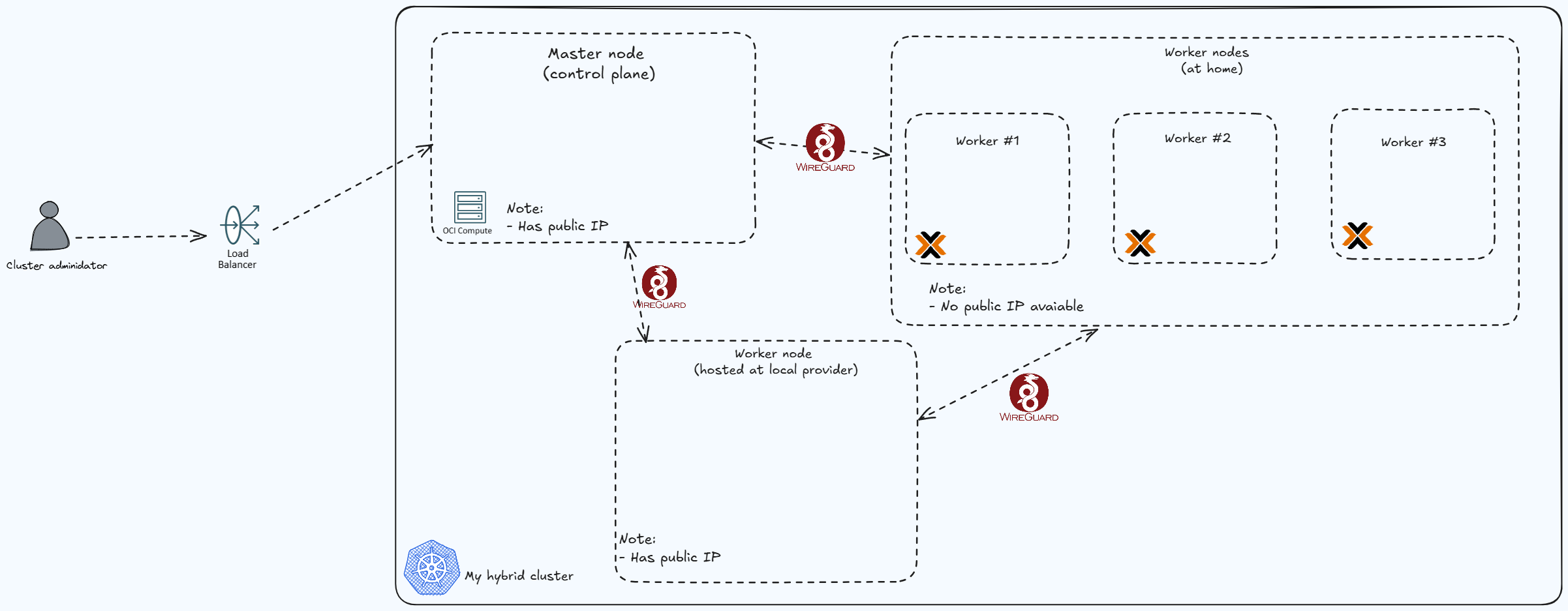
| 1x Control plan | VM.Standard.A1.Flex 1 OCPU 6Gi RAM | Oracle Free tier |
| 3x Worker nodes | 1x Core 6Gi RAM | Hosted on a mini PC using Proxmox. The host machine spec: 6 x Intel(R) Core(TM) i5-8500T 32Gi RAM |
| 1x Worker node aka "data" node | 8192MB RAM 60GB NVMe RAID-10 Hard drive 4 cores @ EPYC Milan CPU | I rent this a low-end provider with 6$ per month. This node is mainly used for stateful workload & public ingress. |
- Node diagram:
Journey
I would like to categorize the setup, so far, into three stages :
- Cluster Bootstrap / Minimal Setup
- In this stage, I followed some online guides to bootstrap a basic Kubernetes cluster. The goal was simple: run a basic “echo” web application and access it using kubectl port forwarding (tunneling).
- Exposing services to the internet
- For this stage, I want to find a my to expose my services to the internet, and automate certification issusing / dns records
- Storage Configuration / Stateful workloads
- Sooner or later, you'll run into the need to run stateful workloads (where pvc is required) on your cluster — there's just no way around it.
- In my case, I try to avoid stateful workloads as much as possible, especially given the complexity they add in a hybrid or home-lab environment.
- That said, I do need to deploy a private container registry. This will allow me to publish my Java and Node.js containers without relying on Docker Hub — which, unfortunately, only offers one private repository on the free tier 😅.
Challenges
I've tackled several problems along the way. Below are some challenges:
1. Connectivity between nodes
Problem:
How to connect all nodes together?
Solution:
- I used KubeSpan (a feature of Talos OS) to connect all nodes automically. Without this, i would have run wireguard instances on every machines and advised the correct IP Range between nodes.
2. HA setup for Control Plan
Problem:
What would be the setup that we can implement HA easily?
Solution:
- I used Oracle LoadBalancer (which is a part of Free Tier).
- I created a load balancer setting before the control plan node, right now it has only 1 backend pointing to my single control plan node, but if i want to scale up, I can easily add 2 more nodes, and add more backend to the loadbalancer.
3. Way to expose service to the internet
Problem:
How to expose services to the internet without exposing public IP? (There's an exemption for this, read me on the next following problem)
Solution:
- Cloudflare Tunneling is my choice, combine with ingress-nginx. This is a perfect stack to expose application to the internet IMO.
- I also implemented external-dns to sync the kubernes dns automatically to cloudflare (my domain is also hosted on cloudflare :D)
4. Storage Configuration
Problem:
I needed to run a database on the cluster, which meant I had to properly configure storage. Given the situation, I didn’t want to rely on my home disk since it's not reliable and also would need to spend effect backup regularly.
For this, I want to rely on external providers such as Oracle, or a local VPS provider.
Proposal:
- Oracle-based options
Free tier includes Up to 2 block volumes, 200 GB total. Right now I have 2 options:
- Allow workload on my single control plan, use nodeSelector to distribute stateful workload on this node only. Not ideal, since it's generally bad practice to run workloads on a control plane node.
- Setup another worker node on Oracle (still have some quota from the Free Tier), use this as a data node. Sounds reasonable to me
- Local Provider
In this option, I will rent a VPS from a local provider, and setup this as a data worker node :D
Solution:
- I decided to go with option 2 because I don't want to rely too much on oracle. That's it :D
- To give a bit more detail: I used
OpenEBSas a CNS, and use LocalPV mode to deploy on the "data" node. Force all stateful applications deploy on this node only (such as databases)
5. Harbor Issue When Using Cloudflare Tunneling
Problem:
- I exposed Harbor using Cloudflare Tunnel, but ran into issues when pushing large images (typically over ~150MiB in size).
- After some research, it seems Cloudflare Tunnel (at least on the Free Tier) has limitations on the size of individual requests, which causes push operations to fail.
Proposal: Since Cloudflare Tunnel doesn't work well for my Harbor deployment, I considered two options:
Deploy a VPN (or use a service like Tailscale) to connect clients with Harbor running on my cluster.
- Limitation: This requires clients to enroll in the VPN, which is inconvenient and adds extra friction to the workflow.
Deploy
nginx-ingresswithhostNetworkmode to expose the service via a public IP.- Limitation: This exposes a public IP directly (raises security concerns) and introduces a single point of failure — if the node goes down, Harbor becomes inaccessible from the internet.
Solution:
I decided to go with option 2, because:
- I don’t want to introduce a VPN just to access Harbor.
- I can tolerate the security concerns for now.
- The current Harbor deployment already relies on the "data" node, so I’m already accepting a single point of failure 😅.
Tech stack
| Logo | Name | Description |
|---|---|---|
| FluxCD | GitOps Solution | |
| cert-manager | Certificate Management | |
| cloudflare | DNS & Zero Trust to protect internal applications, tunnel solution to expose workload to internet | |
| external-dns | Automatically sync cluster dns to external providers | |
| nginx | Ingress controller | |
| harbor | Container Registry | |
| openebs | CNS for cluster | |
| grafana | Observability stack | |
| prometheus | Observability stack | |
| metrics-server | Observability stack | |
| infisical | External Secret provider | |
| postgres | Database | |
| redis | Database | |
| sops | Tool to manage secrets | |
| Wireguard | VPN solution | |
| helm | Package manager for Kubernetes | |
| Loki | Log storage & Engine |
Limitations
1. Stateful workload limited to single node
2. Single point of failure
Besides the first one, the public ingress controller for harbor is currently running on the 'data' node.
Knowledge gaps for me
- Understanding of security concern about hostNetwork ingress controller on data node
- RBAC setups for cluster?